Network Switching and Design
3.6.2025
At my home lab today was a good day. After much trial and error, and even managing to completely lock myself out of my switch, I think I finally have a grasp on the concept of tagging/untagging.
Here's my setup: Tagging all VLANs on port 1 of my switch to make a trunking port. Untagging VLAN 2 on port 2, 3 on port 3, 4 on port 4, and 5 on port 5. Then I put PVID on port 1 to 666, and mirrored the untagged setup. This way, the default VLAN 1 is completely unused on my homelab segment, and only my specific VLANs are sent across the trunk port and untagged on very specific ports.
I also on the Ubiquity side set my default VLAN id to 666 which sends to a class B 172 address that is not used anywhere else in my home lab. This way I can later set alerts to notify of any traffic going onto that port. Now it's time to review and then move onto firewall rules to truly segment my VLANs.
10.6.2025
Today I sat down and had some fun creating VLANs. I think I went a little bit overboard for my setup. But I settled on the following:
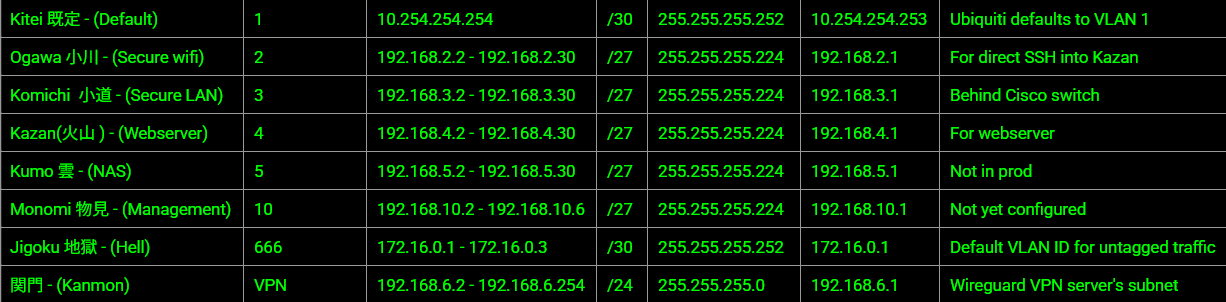
I decided to attempt and reduce my attack surface by going with smaller subnet masks. Hopefully this doesn't bite me in the bud later.